
Troubleshooting
The SDK never throws because of a setup problem: it falls back, keeps your app running and tells you once, in the console and in the publisher dashboard. This page explains each message and what to do. The dashboard's warnings link straight to the matching section.
Turn on the debug overlay in a development build to see the state on the TV itself: the listing status, test mode and its reason, and any integration warning.
SofAds.debug(true);Only test ads
Every ad has a small "Test ad" label, and the SDK logs one console line at start-up that starts with SofAds: test ads only, followed by the reason and the next step. The reason is also in the ready event (test_mode.reason) and on the listing in the dashboard as a Test mode badge.
| Reason in the console | Why | What to do |
|---|---|---|
| listing in development | The listing isn't live yet: it has no store URL, or our app-ads.txt line isn't found yet. The dashboard tells the two apart ("In development" or "Pending: add app-ads.txt"). | See listing pending and app-ads.txt not found. |
| listing in review | SofAds is reviewing the listing. | Nothing: live ads start as soon as the review is done. |
| unknown listing | The SDK reports a platform or app ID that has no confirmed listing for this app. | Add or confirm the listing for this platform, with the app ID the SDK reports. |
| test device (install ID …) | This TV's install ID is one of the app's test devices. | Remove it from the app's test devices to see live ads on it. |
| SofAds live demo app | The live demo always gets test ads. | Nothing. |
| (no console line) | Your build asks for test ads with test: true. | Remove test: true from SofAds.init in your release build. |
Test ads are never billed and never earn; the dashboard counts them as test impressions. What each placement shows is on test ads and test devices.
No fill
showInterstitial() and showRewarded() resolve with status: "no_fill" when there is no ad to show right now, and the SDK emits a no_fill event with a reason. This is normal: carry on with your app (continue the game, skip the reward offer). Don't retry in a loop; ask again at the next natural break.
SofAds.on("no_fill", (e) => console.log("no ad for", e.placement, e.reason));The reason is for your logs only. Behavior never depends on it, and new reasons can appear:
| Reason | What it means |
|---|---|
no_inventory | No campaign or partner had an ad for this request. Common in a young network, in smaller countries and for Made for children apps. |
frequency_cap | This TV has seen enough ads for now: a cap of the placement or of a campaign. |
placement_disabled | The placement is switched off in the dashboard. |
unsupported | The placement type isn't one SofAds serves. |
brand_safety | Partner ads came back without the information our brand-safety checks need, or matched a block, so they were dropped. |
kill_switch | Ads are paused for this app, SDK version or format. See kill switch. |
unknown_app, listing_removed | The app ID isn't known, or the listing is marked as removed from the store. Check the app ID in SofAds.init and the listing. |
invalid_traffic | The request failed our traffic checks. |
retry_after | The ad server asked the SDK to wait a moment before asking again for this placement. |
wrapper_no_ad | A partner's video ad chain ended without a playable ad. |
rate_limited | The live demo only: too many requests from one network. |
A show call can also end with status: "timeout" (reason show_timeout or request_timeout) when the network is too slow; treat it like no fill. The full ShowResult is in the SDK reference.
Kill switch
SofAds can pause ads remotely, without an app update, when something goes wrong: for all apps, for one SDK version, for one ad format or rendering method, or for one app (for example during an account hold). The SDK reads these switches with its start-up configuration and checks again during long sessions, so a switch applies within minutes, without a restart.
- With ads paused, every show call resolves with
status: "no_fill"and reasonkill_switch, often without any network request. Your app keeps running. - A paused format only removes that format: the placement may still fill with another one.
- Analytics have their own switch; ads keep working when only analytics are paused.
There is nothing to fix in your app. If ads stay paused for your app, check your email and the dashboard, or ask us at the address on the contact page.
webapis.js missing on Tizen
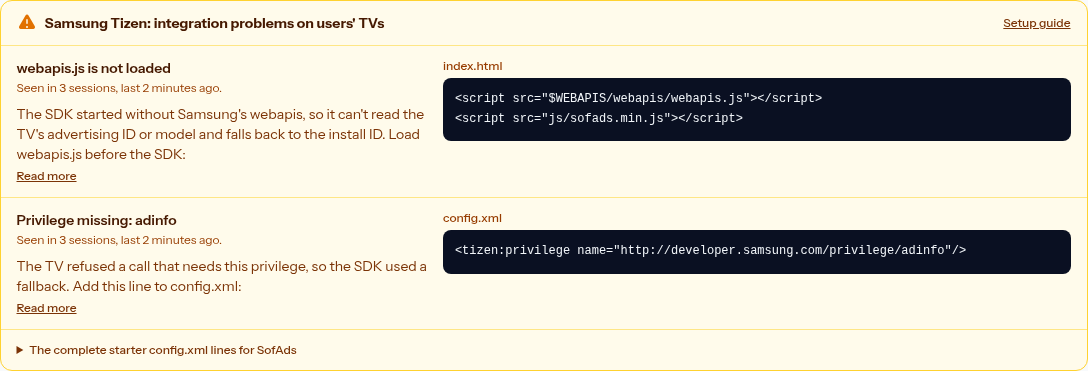
On a Samsung TV the SDK logs:
SofAds: webapis.js not loaded; include $WEBAPIS/webapis/webapis.js before the SDK. Setup: https://sofads.com/docs/tizen-setupThe Tizen runtime only provides Samsung's Web APIs through a script tag in your HTML, and the SDK reads the advertising ID (TIFA), Limit Ad Tracking and the TV model through them. Add the tag before the SDK:
<script src="$WEBAPIS/webapis/webapis.js"></script>
<script src="js/sofads.min.js"></script>
Until you do, ads still work, but with the SDK's own install ID instead of TIFA, so they can't be personalized and Google demand may not fill. The session reports webapis_missing, and the dashboard shows an integration warning on the Tizen listing until sessions without it come in.
A related warning, SofAds: missing Tizen privilege …, means a call was refused because config.xml lacks that privilege. Add the line it names; the complete list is in the Tizen starter config.xml.
On packaged apps, the SDK also reads your config.xml once at start-up. When starter lines are missing, it logs one warning that starts with SofAds: config.xml is missing SofAds setup lines and lists them, such as <access origin="*" subdomains="true"></access> or <tizen:allow-navigation>*</tizen:allow-navigation>, with the exact line to add. The debug overlay shows the same warning.
Listing pending
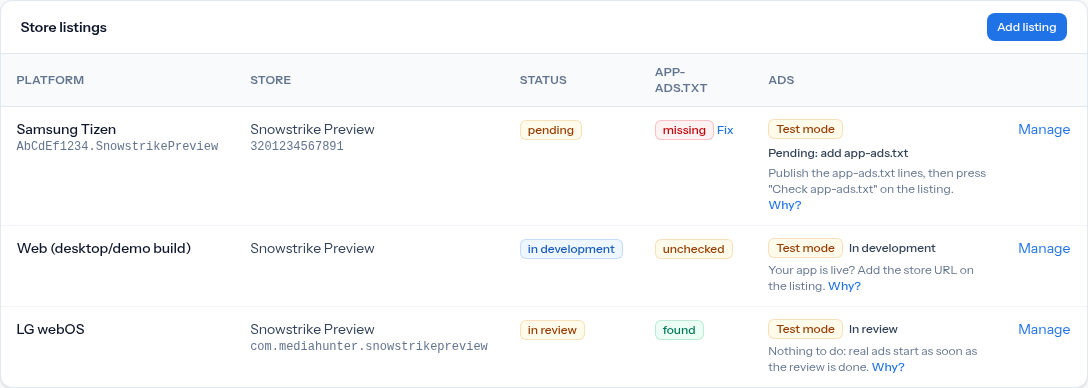
A listing gets live ads only when it is live. Until then it gets test ads, and the dashboard shows why:
| Listing | What it means | Next step |
|---|---|---|
| In development | No store URL yet. | Once the app is live in the store, add the store URL on the listing ("Your app is live? Add the store URL"). |
| Pending: add app-ads.txt | Real ads start once our app-ads.txt line is found on your developer website. | Publish the line, then press Check app-ads.txt on the listing. Without a known developer website, add it on the listing first. |
| In review | SofAds is reviewing the listing. | Nothing: live ads start when the review is done. |
| Live | The line was found. | Nothing. |
SofAds checks app-ads.txt when you save the listing and then every day, so a listing also goes live by itself after you publish the line. A live listing whose line disappears goes back to pending. The full story is on listings and app-ads.txt.
app-ads.txt not found
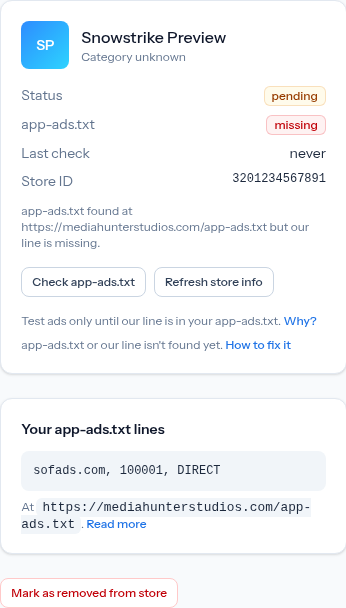
The last check on the listing says Not found: there is no app-ads.txt at the root of the developer website SofAds checked. Check these, then press Check app-ads.txt:
- The right website. SofAds reads the developer URL from your store page, or the developer website you entered on the listing. The file must be on that site, not on another domain.
- The root.
https://yourstudio.example/app-ads.txt, not in a subfolder and notads.txt. - Plain text, publicly reachable. No login, no redirect to a page, served over HTTPS (or HTTP).
- The SofAds line in it, exactly as the listing shows it, with your seller ID.
| Last check | Meaning |
|---|---|
| Not found | No file at the root of the website. |
| Missing | The file exists, but without the SofAds line. |
| No developer URL | SofAds doesn't know your website yet: add the store URL or the developer website on the listing. |
| Error | The website couldn't be reached; SofAds tries again at the next check. |
While the check fails, the listing stays (or goes back to) pending, with test ads only. Where the line goes, and the exact format, is on app-ads.txt.
Made for children not answered
Every app has to answer "Is this app made for children?" in the dashboard. Until you answer, SofAds treats the app as made for children, the safe choice:
- the SDK reads no TV advertising ID (TIFA, LGUDID and others) and sends no device ID to any demand;
- no signal providers, such as Google PAL, run in the app;
- only SofAds' own reviewed campaigns and demand marked child-safe may fill, so you will see more no fill and earn less.
Answer the question on the app's page in the dashboard. The answer is your responsibility as the publisher (the publisher terms say so): choose yes when the app is directed at children, even partly. The SDK picks up the change with its next configuration refresh, without an app update. What changes for a children's app is on privacy and consent.
Keep reading
- Release checklist: avoid these problems before you submit.
- SDK reference: every call, option and event.
- Samsung Tizen setup: index.html and config.xml.