
Creatives and specs
A creative is the ad a viewer sees on the TV. You build it in the creative editor, in the campaign wizard or on the campaign page, with a live preview drawn by the same SDK the TV apps use. One creative can have several language versions.
Types of ad
| Type | What it is | Good for |
|---|---|---|
| QR card | A full-screen image or color with your offer on the left and a QR code on the right. | Scans and conversions. The only type for "reward after scanning". |
| Video | Your MP4, served from our CDN, optionally with a small QR code in the corner. | Reach and awareness. |
| VAST tag | A URL from your own ad server, fetched by our servers when the ad is served. | Ads you already run elsewhere. |
| HTML | A self-contained 1920×1080 page, shown full screen. | Special formats. Add a landing URL to show a QR code. |
The QR card
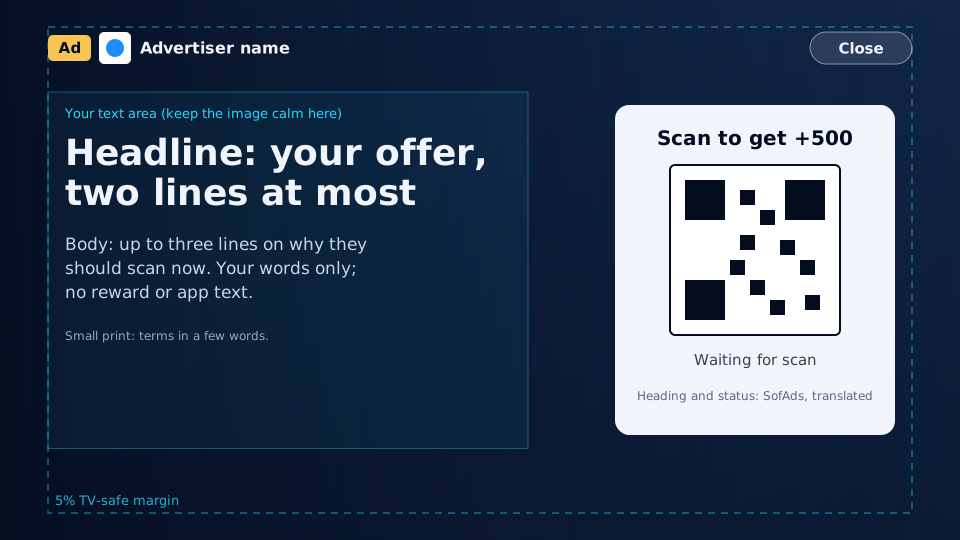
The screen is 1920×1080, seen from three meters away. Three parties own its parts, and they never mix:
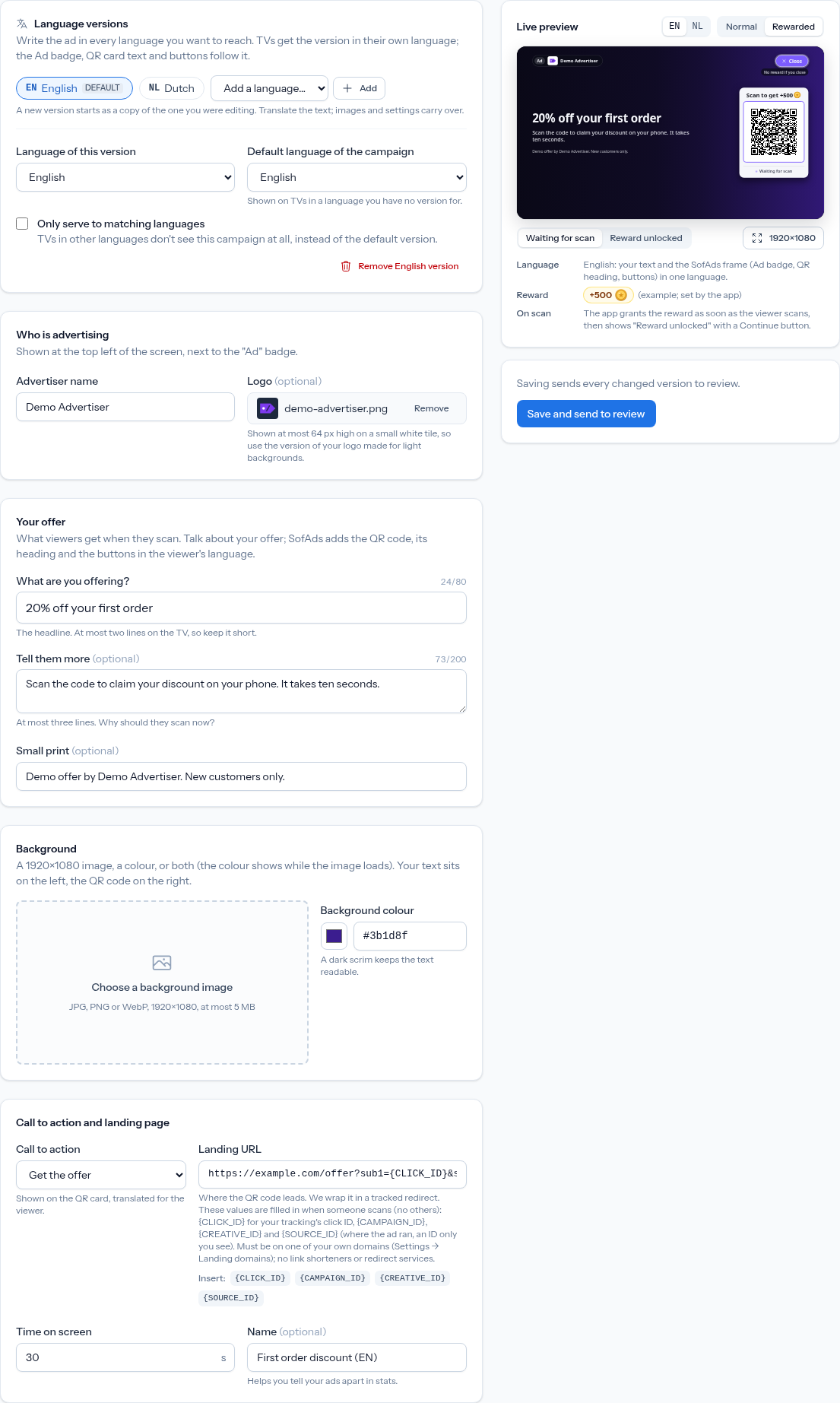
- You (the advertiser): your name and optional logo, the headline, body, small print, the background, the call to action and the landing page.
- The app (the publisher): the reward, for example "+500" with the app's coin icon. You never write reward text.
- SofAds (the frame): the "Ad" badge, Close, the QR card's heading and status lines, and the buttons, translated into the viewer's language.
| Field | Limit | On the TV |
|---|---|---|
| Advertiser name | 60 characters | Top left, next to the "Ad" badge. Required when you add a logo. |
| Logo | PNG, JPG or WebP, up to 1 MB and 2048 px | At most 64 px high on a small white tile: use your logo for light backgrounds. |
| Headline ("What are you offering?") | 80 characters, required | At most two lines, at least 64 px. |
| Body | 200 characters | At most three lines. |
| Small print | 140 characters | Under the body, in small type. |
| Background image | JPG, PNG or WebP, up to 5 MB, ideally 1920×1080 | Full bleed, with a dark gradient behind the text. |
| Background color | A hex color, e.g. #0a1022 | Shows while the image loads, or on its own. |
| Call to action | Learn more, Get the offer, Sign up, Download, Shop now | The QR card heading, translated. In rewarded slots the heading becomes "Scan to get +500" instead. |
Keep the busy parts of your image out of the text area: the left half of the screen, from about 17% to 83% of its height. The editor shows that safe zone over your image and warns when the text area is too busy to read. The QR code is at least 300×300 px with a white quiet zone, and everything stays inside the 5% TV-safe margin.
Video
- File: MP4 (H.264), ideally 1920×1080, up to 200 MB. Length and size are read from the file.
- Upload it rather than linking it: SofAds serves uploads from its own CDN,
cdn.sofadsrv.com, so the file is fast on every TV and can't change after review. - On the TV: interstitial videos become skippable after a few seconds (the "Skip ad" button of the skippable ads page); rewarded videos are never skippable.
- QR in the corner: optional, with a one-line headline next to it. Add a landing URL to show it.
VAST tag
Paste an http(s) URL from your own ad server. Our servers fetch it each time the ad is served, follow wrappers, and send the TV an InLine VAST with a playable MP4. Macros are filled in:
https://ads.example.com/vast?app={APP_BUNDLE}&country={COUNTRY}&cb={CACHEBUSTER}Languages
Write the ad in every language you want to reach: English, Dutch, German, French, Spanish, Italian, Polish and Portuguese. A TV gets the version in its own language, and the frame (the "Ad" badge, the QR card text, the buttons) follows the version shown, so the screen is never mixed.
- A new language version starts as a copy of the one you were editing; translate the text, and images and settings carry over.
- The campaign's default language is shown on TVs in a language you have no version for.
- Only serve to matching languages turns that fallback off.
Landing URL and macros
The QR code leads to your landing URL through a tracked redirect, so each scan is counted. The URL must be on one of your verified landing domains; link shorteners and redirect services are refused. Four macros are filled in when someone scans:
https://example.com/offer?click={CLICK_ID}&source={SOURCE_ID}&creative={CREATIVE_ID}| Macro | Filled with |
|---|---|
{CLICK_ID} | The unique ID of this scan. Put it in your tracking's click ID or sub-ID to count conversions. |
{CAMPAIGN_ID} | The campaign ID (cmp_…), the same as the postback cid. |
{CREATIVE_ID} | The creative ID (crt_…), as the creative's page in the dashboard shows it. |
{SOURCE_ID} | Where the ad ran, as an anonymous source ID (src_ and 16 letters or digits). See below. |
These four are the only macros. Any other text in braces, such as {COUNTRY} or {APP_ID}, is refused when you save the landing URL, so a QR code never sends a viewer to a URL with an unfilled placeholder. Values are URL-encoded. The viewer's device IDs, IP address and the app the ad ran in are never available as macros: the landing page opens on the viewer's phone, on your site, and that information stays with SofAds.
Source IDs
{SOURCE_ID} tells your tracking which scans and results came from the same place, without telling you which app that is:
- One ID per app, just for you. The same app has the same source ID in all your campaigns, so you can compare sources over time. Another advertiser sees a different ID for that app, so IDs can't be matched between advertisers.
- Anonymous. A source ID is a one-way code made on our servers. It can't be turned back into an app, a publisher or a platform, and nothing in the dashboard, the API or exports shows which app is behind it.
- Empty for house ads. SofAds' own house campaigns have no advertiser, so the macro is empty there.
Your stats have a By source breakdown on the same IDs. Sources with very little delivery in the period are grouped as "Other sources", so a source ID never singles out a small app. If a source doesn't work for you, block it from the stats page: none of your organization's campaigns run there any more, while other advertisers are not affected. Earlier scans from a blocked source still count for conversions.
Family-safe ads only
TVs are shared living-room screens, often with children watching, so every ad must suit all ages. Alcohol, tobacco and vaping, gambling, dating, political or issue ads, adult content, weapons, drugs and get-rich-quick or crypto schemes are never allowed, in the ad or on its landing page. No fake buttons or system messages, no flashing or strobing, and an honest offer. The full rules are in the ad policy.
SofAds reviews every creative before it runs. A changed creative or landing URL goes back to review, and the last approved version keeps running meanwhile.
Sources
Checked on October 8, 2026.
- W3C: Understanding WCAG 2.2, Three Flashes or Below Threshold (2.3.1)
- IAB Tech Lab: VAST (Video Ad Serving Template)
Keep reading
- Creating a campaign: targeting, schedule and budget.
- Conversion postback: count results with the click ID.